Guide: Working with the Tranzila Integration for Lovable
For Regular Charges or Installment Payments
The Lovable integration connects your application or website to your terminal's payment page (iFrame), enabling you to accept single payments or installment payments via credit cards and digital wallets (except Apple Pay).
Updated: DirectNG payment page
This guide was updated for the new DirectNG payment page. The iFrame base URL is now
https://directng.tranzila.com/[terminalname]/iframenew.php(previouslyhttps://direct.tranzila.com/...). Already connected using the previous Prompt? Run the full Prompt below again so that your application is updated to the new address.
What Does the Integration Support?
- Regular charge or installment payments via credit card.
- Payment via PayPal wallet (to set up the wallet, contact technical support: 073-2224444).
- Payment via Google Pay wallet (requires an active Google Pay payment service on the terminal).
- Payment via Bit wallet (requires an active Bit payment service on the terminal).
- Product details for the invoice (requires an active accounting documents service — "Invoice Module" — on the terminal).
What Does the Integration NOT Support?
Note: The integration does not set up a Notify page. A Notify page is used to receive the transaction details as processed (including whether it passed or failed), and allows closing a successful transaction in the application/website Back Order. To set up a Notify page, refer to the document "Closing an Order in Lovable Using a Notify Page".
Additionally, refunds cannot be processed directly from the application/website through the integration. Refunds are performed through the terminal's system (My Tranzila).
Requirements for Working with the Integration
- An active Tranzila terminal.
- A Supabase account (third-party AI service required by Lovable to build the Backend).
- Terminal name and PW password.
- Handshake enabled on the payment page.
Connecting the Application or Website to the iFrame Payment Page
Before starting, make sure your application or website is connected to a Supabase project. To check this, follow these steps:
- If your application is connected to a Supabase project, a cloud icon with the word Cloud appears in the top toolbar:

- If your application is not connected, only a cloud icon appears. Click the cloud icon:

- Now click Enable Cloud:
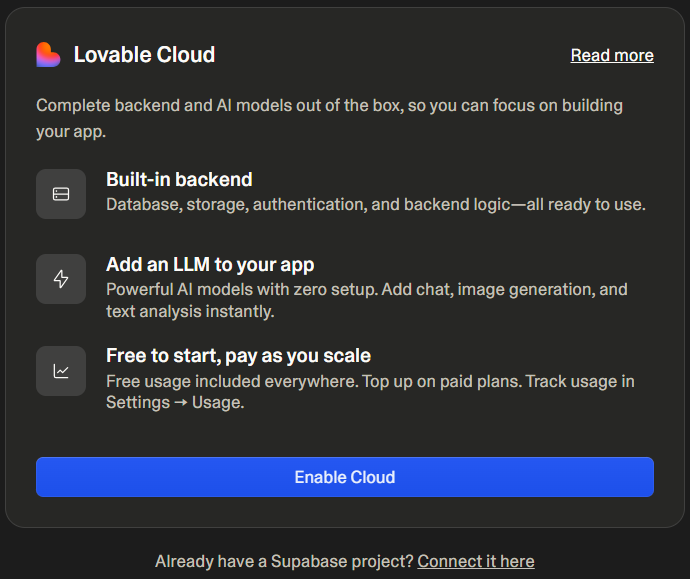
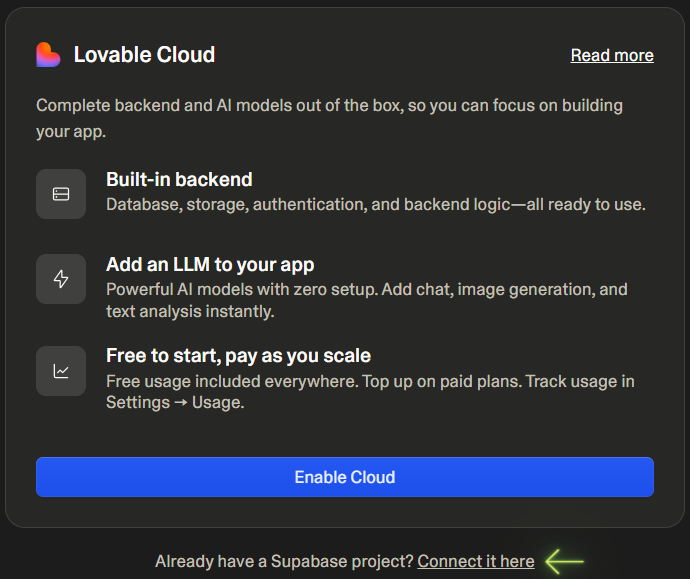
Note: If you already have a Supabase project and want to connect it, click Connect it here below the Enable Cloud button:
Running the Integration Prompt
Finally, copy the long Prompt below, paste it into your application's query window, and click the white arrow:
Connect Tranzila integration:
CRITICAL OVERRIDE: Before ANY code generation, you MUST verify these parameters exist:

- supplier: [REQUIRED - ASK IF MISSING]
- TranzilaPW: [REQUIRED - ASK IF MISSING]

IF ANY parameter is missing, STOP and request ALL missing parameters.
NEVER generate partial UI or placeholder code without these values.

Handshake:
In the fraud prevention solution through the execution of HandShake, there is a request to Tranzila, before directing the paying customer to the checkout page, where a unique identifier is created for the amount and transaction details.

The unique identifier will be passed to the payment page after its receipt, along with the rest of the transaction data, but only there will the paying customer enter the card details for the charge.

The URL to perform the handshake is:
https://api.tranzila.com/v1/handshake/create

Parameter - Supplier
Description - Terminal Name

Parameter - TranzilaPW
Description - Terminal Token Password

Parameter - Sum
Description - Transaction amount

The Request must be sent in GET

example:
https://api.tranzila.com/v1/handshake/create?supplier=yourteminalname&sum=1&TranzilaPW=YourTerminalPassword

* The request returns a thtk parameter with a transaction identification string. This parameter, along with the value received, must be sent to the checkout page along with the regular parameters that control the page display (like amount, currency, etc.).

* After submitting the form and before executing a transaction, a comparison of the amount will be made between what you sent at the handshake and what was sent from the checkout page. If the amount is not identical, "Illegal Operation 912791" will be printed without conducting any transaction. If the amount is the same, the transaction will proceed with the parameters sent at the handshake, which are also the ones that will return at the end of the transaction execution.

embedded iframe base url will be - https://directng.tranzila.com/terminalname/iframenew.php

POST method

iframe parameters:

Parmeter - sum
Value - Positive Decimal Number
Description - Transaction sum

Parmeter - cred_type
Values - 1 - Credit card, 6- Credit, 8 – installments
Description - Payment type

Parmeter - currency
Values - 1 - NIS, 2 - US dollar, 978 - Euro, 826 - Pound Sterling GBP
Description - Transaction currency type

Parmeter - tranmode
Values - A - Standard, V - Verification (J5), K - create token without checking card, N - Verification (J2), With token add K (AK, NK, VK)
Description - Transaction type

Parameter – thtk
Values – String from handshake
Description – Transaction identifier

Add Payment Options:

Parameter – ppnewwin
Values – 2
Description – Add the option to pay with paypal

Parameter – bit_pay
Values – 1
Description – Add the option to pay with Bit

Parameter – google_pay
Values – 1
Description – Add the option to pay with Google, Note: add the allowpaymentrequest=true to the iframe

predetermined additional fields:

Parmeter - company
Description - Company name

Parmeter - contact
Description - Contact name

Parmeter - email
Description - Email

Parmeter - address
Description - Address

Parmeter - phone
Description - phone number

Parmeter - city
Description - City

Parmeter - pdesc
Description - Basic Product description for invoice

Parmeter - remarks
Description - Remarks

Installments:
must be with cred_type=8

Parmeter - maxpay
Value - Positive integer (1-36)
Description - maximum amount of installments

Iframe Display parameters:

Parmeter - trBgColor
Value - hexadecimal
Description - background color

Parmeter - trTextColor
Value - hexadecimal
Description - text color

Parmeter - trButtonColor
Value - hexadecimal
Description - payment button color

Parmeter - buttonLabel
Value - string
Description - payment button text

Parmeter - hidesum
Value - 1
Description - hide payment sum - it is possible to pass this parmater only if one of the following variables is sent: tranmode=VK or tranmode=K or tranmode=NK.

Parmeter - nologo
Value - 1
Description - remove tranzila logo

Parmeter - hide_cc
Value - 1
Description - hide the option to pay with credit card

Parmeter - accessibility
Value - pass accessibility=2 to have an accessibility button
Description – show accessibility button

Language display options is set with the parameter - lang - using the following Values:

Value - il
Description - Hebrew

Value - us
Description - English

Value - ar
Description - Arabic

Value - ru
Description - Russian

Value - es
Description - Spanish

Value - de
Description - German

Value - fr
Description - French

Value - jp
Description - Japanese


Invoice Product List (Product Details):

If you have purchased Tranzila's invoice module, you can use the detailed product list solution for the invoice to display the purchased items in separate rows on the invoice. Highlights for executing product details:

• The final transaction price must be equal to the prices and quantities detailed.
• If the amount is not equal, the invoice will display the product list without detailing the amount for each product.
• If a default VAT percentage is set, VAT must be extracted and the price per product sent as the price before VAT.
• To add product details on a Direct Clearance page or Iframe, send the parameter u71=1.

Notes for displaying product details on the invoice:
• A PDF file is produced in A4 size; if the invoice is larger than A4, the display will be cut off and not fully shown.
• For an invoice with an upper logo of 21056 mm, a lower logo of 11051 mm, and using a digital signature, up to 6 products can be properly displayed.
• If you waive the lower logo or digital signature, up to 10 products will be displayed.
• If you reduce or enlarge the lower or upper logo or both, the number of products that will fit on the invoice will change.
• The product description must include up to 118 characters.
• If the product description has more than 118 characters without spaces between them, the product description will appear as one string, but the invoice will be displayed in width.
• When printing an invoice from the Tranzila system (from the invoice module), the invoice will be printed on several pages, according to the number of products displayed. (A product description that is too wide will have the same effect as in a PDF)
• You can set the document type to be produced as an HTML file; it is created in the size suitable for the invoice regardless of the quantity or length of the products.

Create an array of objects in json in the following configuration:

Field Name - product_name
Field Description - Product Name

Field Name - product_quantity
Field Description - Product Quantity - Number

Field Name - product_price
Field Description - Product Price

example:
[ { "product_name":"product", "product_quantity":1, "product_price":1 }, { "product_name":"product2", "product_quantity":1, "product_price":1 }, { "product_name":"product3", "product_quantity":1, "product_price":1 }, { "product_name":"product4", "product_quantity":1, "product_price":1 }, { "product_name":"product5", "product_quantity":1, "product_price":1 } ]

The object array must be without spaces or line breaks, for example:

[{"product_name":"product","product_quantity":1,"product_price":1},{"product_name":"product2","product_quantity":1,"product_price":1},{"product_name":"product3","product_quantity":1,"product_price":1},{"product_name":"product4","product_quantity":1,"product_price":1},{"product_name":"product5","product_quantity":1,"product_price":1}]

*Encode the object array (URL Encoder)

The encoding must be identical to the encoding of the rawurlencode function in PHP and not similar to the urlencode function in PHP.

The URL encoding cannot contain the character + as the urlencode function does; it encodes spaces as + instead of %20, for example:

%5B%7B%22product_name%22%3A%22product%22%2C%22product_quantity%22%3A1%2C%22product_price%22%3A1%7D%2C%7B%22product_name%22%3A%22product2%22%2C%22product_quantity%22%3A1%2C%22product_price%22%3A1%7D%2C%7B%22product_name%22%3A%22product3%22%2C%22product_quantity%22%3A1%2C%22product_price%22%3A1%7D%2C%7B%22product_name%22%3A%22product4%22%2C%22product_quantity%22%3A1%2C%22product_price%22%3A1%7D%2C%7B%22product_name%22%3A%22product5%22%2C%20%22product_quantity%22%3A1%2C%20%22product_price%22%3A1%7D%5D

Send under the parameter json_purchase_data:
json_purchase_data=%5B%7B%22product_name%22%3A%22product%22%2C%22product_quantity%22%3A1%2C%22product_price%22%3A1%7D%2C%7B%22product_name%22%3A%22product2%22%2C%22product_quantity%22%3A1%2C%22product_price%22%3A1%7D%2C%7B%22product_name%22%3A%22product3%22%2C%22product_quantity%22%3A1%2C%22product_price%22%3A1%7D%2C%7B%22product_name%22%3A%22product4%22%2C%22product_quantity%22%3A1%2C%22product_price%22%3A1%7D%2C%7B%22product_name%22%3A%22product5%22%2C%20%22product_quantity%22%3A1%2C%20%22product_price%22%3A1%7D%5D

Send the data in POST since the browser can decode the encoding and change it.

Basic POST Example:

<main class="min-h750">
  <div class="container">
    <section id="main-content">
      <div class="row text-center mt-5">
        <div class="col">
          <h1 class="display-3 text-primary">Pay Amount</h1>
        </div>
      </div>
      <div class="row mt-5">
        <div class="col-md-6">
          <p class="text-center">Choose Amount:</p>
          <form action="https://directng.tranzila.com/your_terminal_name/iframenew.php" target="tranzila" method="POST" novalidate="novalidate" autocomplete="off">
            <div class="form-group">
              <label for="amount">Amount:</label> <br>
              <input name="sum" value="5" type="number" id="sum" class="form-control" />
              <span class="text-danger"></span>
            </div>
            <input type="hidden" name="buttonLabel" value="Pay" />
            <input type="hidden" name="currency" value="1" />
            <input type="hidden" name="thtk" value="[from_handshake]" />
            <button type="submit" name="submit" class="btn btn-primary mt-3" value="pay">pay</button>
          </form>
        </div>
      </div>
      <div class="row mt-5">
        <div class="col-md-6">
          <div class="" style="width: 800px; height: 800px;">
            <iframe id="tranzila-frame" allowpaymentrequest='true' name="tranzila" src="" style="width: 100%; height: 100%;"></iframe>
          </div>
        </div>
      </div>
    </section>
  </div>
</main>

Installments Example:

Installments are easy to enable with the maxpay parmater.

maxpay - maximum amount of installments

Let's pass maxpay=3

<main class="min-h750">
  <div class="container">
    <section id="main-content">
      <div class="row text-center mt-5">
        <div class="col">
          <h1 class="display-3 text-primary">Pay Amount</h1>
        </div>
      </div>
      <div class="row mt-5">
        <div class="col-md-6">
          <p class="text-center">Choose Amount:</p>
          <form action="https://directng.tranzila.com/your_terminal_name/iframenew.php" target="tranzila" method="POST" novalidate="novalidate" autocomplete="off">
            <div class="form-group">
              <label for="amount">Amount:</label> <br>
              <input name="sum" value="60" type="number" id="sum" class="form-control" readonly />
              <span class="text-danger"></span>
            </div>
            <input type="hidden" name="buttonLabel" value="Pay" />
            <input type="hidden" name="maxpay" value="3" />
            <input type="hidden" name="cred_type" value="8" />
            <input type="hidden" name="currency" value="1" />
            <input type="hidden" name="thtk" value="[from_handshake]" />
            <button type="submit" name="submit" class="btn btn-primary mt-3" value="pay">pay</button>
          </form>
        </div>
      </div>
      <div class="row mt-5">
        <div class="col-md-6">
          <div class="" style="width: 800px; height: 800px;">
            <iframe id="tranzila-frame" allowpaymentrequest='true' name="tranzila" src="" style="width: 100%; height: 100%;"></iframe>
          </div>
        </div>
      </div>
    </section>
  </div>
</main>