create a credit card transaction
Recommended Integration Workflow
Tranzila supports two ways to submit card details for a credit card transaction:
- Token-based integration — recommended for most integrations.
- Full card number integration — permitted only for PCI DSS-certified integrations.
For non-PCI DSS-certified integrations, do not send the full card number directly to Tranzila through this API. Instead, first tokenize the card using one of Tranzila's secure payment pages, such as an iframe or hosted fields.
A Tranzila token replaces only the full card number. It does not include the card expiry date, CVV, cardholder details, or any other customer data. When required, those values must still be sent together with the token.
Recommended flow:
- Tokenize the card using a Tranzila payment page, iframe, or hosted fields.
- Tranzila securely captures the card details and returns a reusable card token.
- Submit the transaction using the token in the
card_numberfield. - Send the card expiry date, and CVV where required, alongside the token.
This flow keeps the full card number outside your servers while allowing you to continue using the same card_number field in the transaction request.
This endpoint can also be used with an express terminal.
Transaction Types (txn_type)
Use the txn_type parameter to define the type of transaction to perform.
debit— Charges the card and deducts the transaction amount from the cardholder's account.credit— Credits funds back to the cardholder, typically for a refund or adjustment.verify— Performs a verification transaction. Used together with theverify_modeparameter. 3DS is supported.2— J2 verification. Checks the card without capturing funds.5— J5 authorization. Reserves credit for the specified amount. The actual charge is later performed usingtxn_type=force.6— Initializes a standing order (sto). Use the verification response when submitting the laterstotransaction.
sto— Performs a standing order charge. A standing order must first be initialized usingtxn_type=verify. When submitting thestotransaction, pass the related verification transaction reference inreference_txn_id.cancel— Cancels adebitorcredittransaction.reversal— Releases a reserved credit amount from a J5 authorization transaction (verify_mode=5).
Prevent Duplicate Transactions (DCdisable)
The DCdisable parameter helps prevent duplicate charges by using a unique value for each transaction.
When enabled, Tranzila checks whether the same DCdisable value was already used for a successful transaction. If the value was already used, no additional charge will be created.
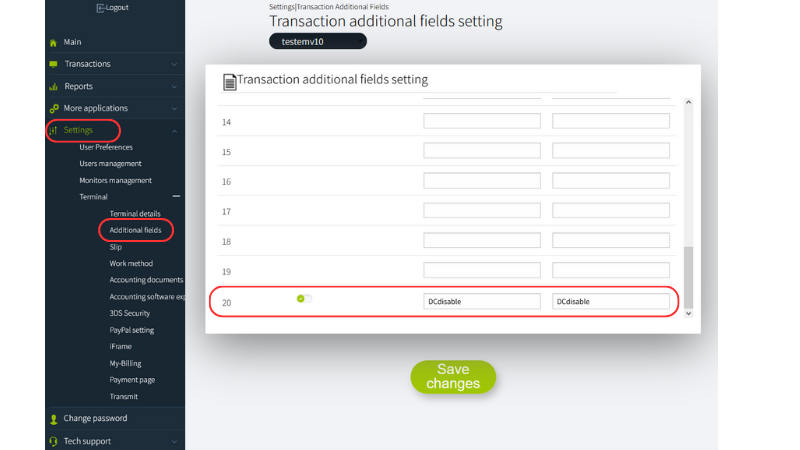
Requirements and behavior:
- In the
my.tranzilasystem, go to Terminal Settings > Additional Fields for Transaction. - Define field 20 only as the field used for
DCdisableduplicate charge detection. - Send the
DCdisableparameter with a unique value for each transaction. - The duplicate check is performed up to 24 hours back.
- The check is performed at the parent terminal level.
- If parent and child terminals are used, define the parameter in both the parent and child terminals.
- If the original transaction failed,
DCdisablewill not prevent a retry because no successful duplicate transaction exists. - The recommended value is a long, complex, unique string.
- The maximum length for the
DCdisablevalue is 254 characters.
If a duplicate transaction is detected, one of the following messages may be returned:
- "This payment has already been made, please contact the business"
- "This payment has already been paid. Please contact customer service."
Visit this page for a code example.
Allocation Number (מספר הקצאה)
For tax invoices on transactions above ₪5,000, the Israel Tax Authority requires an Allocation Number for the amount to be tax-deductible. The Allocation Number is issued based on the customer's registered business ID, registered under their personal ID, or their ח.פ. for a registered company.
If the ID number already sent for card verification (card_holder_id) matches the customer's registered business ID, the Allocation Number is issued automatically.
Otherwise, for example, a registered company, or a cardholder paying on behalf of the business send the correct business ID separately via user_defined_fields, using the name business_id. business_id does not replace card_holder_id; both may be sent, and can hold the same value.
You must log into the my.tranzila system and go to the "Additional Fields for Transaction" screen, located under the terminal settings menu, and define a field named business_id.
If neither card_holder_id nor business_id contains the customer's correct registered business ID, the transaction still completes successfully, but no Allocation Number will be issued for the automatic invoice.
Attaching End-Customer Details to a Transaction
When charging via the API, any end-customer identifying information you want to see on the transaction itself,
company name, contact person, email, external CRM ID, etc. — must be sent through user_defined_fields, not through the client object. client fields are not surfaced on the transaction record or in reports; user_defined_fields are.
Setup (one-time, per terminal):
- In my.tranzila, go to your terminal settings → Additional Fields for Transaction, and define a name for each field you want to send (up to 25 slots:
user_defined_1–user_defined_25). - In your API request, send a
user_defined_fieldsarray with{name, value}objects, wherenamematches the field name you configured.
"user_defined_fields": [
  { "name": "company", "value": "Acme Ltd" },
  { "name": "contact", "value": "Israel Israeli" },
  { "name": "email", "value": "contact@acme.com" }
]
Once configured, these values appear on the transaction and can be filtered on via ufields in the Transaction Reports API.
Card Entry Mode (pan_entry_mode)
Use the pan_entry_mode parameter to indicate how the card details were provided.
50— Transaction by phone. The card was not physically present.51— Manually entered card details.52— Online transaction.
Installments (payment_plan)
Use the payment_plan parameter to define the payment structure.
1— Default. A single regular payment.6— Credit installments. Used when the cardholder has an installment agreement with the credit card company. The merchant receives the full amount, while the cardholder pays in installments, usually with fees. Minimum: 3 payments.8— Regular installments.
Installment transactions should be used together with the relevant installment fields, including:
installments_numberfirst_installment_amountother_installments_amount
Code Examples
Required Fields Only
{
  "terminal_name": "myterminal",
  "expire_month": 7,
  "expire_year": 2025,
  "card_number": "O5d55d2922ca4021382",
  "cvv": "111",
  "items": [
    {
      "name": "Pen",
      "type": "I",
      "unit_price": 10.53,
      "units_number": 1
    }
  ]
}
Transaction Types (txn_type)
Debit (Default)
{
  "terminal_name": "myterminal",
  "txn_type": "debit",
  "expire_month": 7,
  "expire_year": 2025,
  "card_number": "O5d55d2922ca4021382",
  "cvv": "111",
  "items": [
    {
      "name": "Pen",
      "type": "I",
      "unit_price": 10.53,
      "units_number": 1
    }
  ]
}
Credit
{
  "terminal_name": "myterminal",
  "txn_type": "credit",
  "reference_txn_id": 12345,
  "authorization_number": "0587923",
  "expire_month": 7,
  "expire_year": 2025,
  "card_number": "O5d55d2922ca4021382",
  "cvv": "111",
  "items": [
    {
      "name": "Pen",
      "type": "I",
      "unit_price": 10.53,
      "units_number": 1
    }
  ]
}
Verify With verify_mode = 2
{
  "terminal_name": "myterminal",
  "txn_type": "verify",
  "expire_month": 7,
  "expire_year": 2025,
  "card_number": "O5d55d2922ca4021382",
  "cvv": "111",
  "items": [
    {
      "name": "Pen",
      "type": "I",
      "unit_price": 10.53,
      "units_number": 1
    }
  ],
  "verify_mode": 2
}
Verify With verify_mode = 5
{
  "terminal_name": "myterminal",
  "txn_type": "verify",
  "expire_month": 7,
  "expire_year": 2025,
  "card_number": "O5d55d2922ca4021382",
  "cvv": "111",
  "items": [
    {
      "name": "Pen",
      "type": "I",
      "unit_price": 10.53,
      "units_number": 1
    }
  ],
  "verify_mode": 5
}
reversal- release credit limit (j5 verify_mode=5)
{
  "terminal_name": "myterminal",
  "txn_type": "reversal",
  "reference_txn_id": 6769,
  "authorization_number": "0000000",
  "expire_month": 7,
  "expire_year": 2025,
  "card_number": "O5d55d2922ca4021382",
  "cvv": "111",
  "items": [
    {
      "name": "Pen",
      "type": "I",
      "unit_price": 10.53,
      "units_number": 1
    }
  ]
}
Charge With verify_mode = 5
{
  "terminal_name": "myterminal",
  "txn_type": "force",
  "reference_txn_id": 6769,
  "expire_month": 7,
  "expire_year": 2025,
  "card_number": "O5d55d2922ca4021382",
  "cvv": "111",
  "items": [
    {
      "name": "Pen",
      "type": "I",
      "unit_price": 10.53,
      "units_number": 1
    }
  ]
}
Verify With verify_mode = 6
{
  "terminal_name": "myterminal",
  "txn_type": "verify",
  "expire_month": 7,
  "expire_year": 2025,
  "card_number": "O5d55d2922ca4021382",
  "cvv": "111",
  "items": [
    {
      "name": "Pen",
      "type": "I",
      "unit_price": 10.53,
      "units_number": 1
    }
  ],
  "verify_mode": 6
}
Charge With verify_mode = 6
{
  "terminal_name": "myterminal",
  "txn_type": "sto",
  "reference_txn_id": 6967,
  "expire_month": 7,
  "expire_year": 2025,
  "card_number": "O5d55d2922ca4021382",
  "cvv": "111",
  "items": [
    {
      "name": "Pen",
      "type": "I",
      "unit_price": 10.53,
      "units_number": 1
    }
  ]
}
cancel transaction example
{
  "terminal_name": "myterminal",
  "txn_type": "cancel",
  "reference_txn_id": 123,
  "authorization_number": "0000000"
}
Dcdisable and business_id enabled example
{
  "terminal_name": "myterminal",
  "txn_type": "sto",
  "reference_txn_id": 6967,
  "expire_month": 7,
  "expire_year": 2025,
  "card_number": "O5d55d2922ca4021382",
  "cvv": "111",
  "items": [
    {
      "name": "Pen",
      "type": "I",
      "unit_price": 10.53,
      "units_number": 1
    }
  ],
   "user_defined_fields": [
    {
      "name": "DCdisable",
      "value": "your_generated_unique_value"
    },
    {
      "name": "business_id",
      "value": "515123456"
    }
  ]
}
Request
Headers
Request time sent in Unix format (large integer counting seconds from Jan 1 st , 1970 00:00:00
Application public key supplied by Tranzila
A 40 bytes NONCE – unique random string generated with any random bytes function
hash_hmac using ‘sha256’ on application key with secret + request-time + nonce. hash_hmac is available for all programming languages with samples found here: https://www.jokecamp.com/blog/examples-of-creating-base64-hashes-using-hmac-sha256-in- different-languages/
Body
application/jsonILSdebitcreditverifyforcecancelreversalstodebitVerification mode, used together with `txn_type=verify`. * `2` - J2. Checks the card without capturing funds. * `5` - J5. Reserves the credit limit for the specified amount; the actual charge is performed later with `txn_type=force`. * `6` - Initialization transaction for a standing order (`sto`); the actual charge is performed later with `txn_type=sto`.
256512345678910111212202511125641832Either a full card number or a card token. The token replaces ONLY the full card number (it does not contain expiry, CVV or any other card/customer data). Sending a full card number is permitted only for PCI DSS certified integrations; all other API integrations must send a token in this field.
O5d55d2922ca4021382Defines the payment structure. * `1` - Default. A single regular payment. * `6` - Credit installments (cardholder has an installment agreement with the card company; merchant receives the full amount). Minimum 3 payments. * `8` - Regular installments.
16811500100Indicates how the card details were provided. * `50` - Transaction by phone (card not physically present). * `51` - Manually entered card details. * `52` - Online transaction.
505152526769`client` object stores customer identifiers on the request itself but is not attached to the transaction record — it will not appear in the transaction details screen in my.tranzila or in Transaction Reports. To attach end-customer details (company name, contact person, email, etc.) so they appear on the transaction and are searchable in reports, use `user_defined_fields` instead.
Use this to attach end-customer details (company name, contact person, email, etc.) to the transaction so they appear in the transaction details screen in my.tranzila and are searchable in Transaction Reports. Setup (one-time, per terminal): in my.tranzila go to terminal settings → Additional Fields for Transaction, and define a name for each field you want to send (up to 25 slots: user_defined_1–user_defined_25). Then send this array with `name` matching the field name you configured, for example: `[{\"name\": \"company_name\", \"value\": \"Acme Ltd\"}, {\"name\": \"contact_person\", \"value\": \"Israel Israeli\"}]`. Do not use the `client` object for this purpose — it is not attached to the transaction record.
any transaction level remarkenglishhebrewenglishDraco MalfoymycrmAuthorization (approval) number of the original transaction. REQUIRED when txn_type is `credit`, `reversal` or `cancel` (these reference a prior transaction). Ignored for other transaction types.
0587923Responses
The response can be 200 with an Application error code:
| Error Code | Description |
|---|---|
| 20111 | Provided token check failure |
| 20112 | Original transaction not found |
| 21100 | Transaction index is not equal to original transaction index |
| 21101 | Provided index was empty |
| 22101 | Empty authorization number |
| 22100 | Authorization number is not equal to the transaction value |
| 22103 | Invalid DCdisable |
| 23002 | Already Credited this transaction id |
| 23002 | id 4 - sum is larger than the original debit transaction |
| 23001 | Original transaction authorization number is invalid. |
| 23001 | id 1 - Attempting to credit a transaction that has already been canceled |
| 20112 | An origin transaction index is linked to an uncreditable origin transaction (e.g., rejected or non-existent index) or an attempt to credit a different card than the one originally charged. |
Response body
1{
2  "error_code": 0,
3  "message": "success",
4  "transaction_result": {
5    "processor_response_code": "000",
6    "transaction_id": 12345,
7    "Responsecvv": "2",
8    "Responseid": "1",
9    "club_number": "088",
10    "auth_number": "0587923",
11    "card_type": 1,
12    "card_type_name": "Mastercard",
13    "currency_code": "USD",
14    "expiry_month": 12,
15    "expiry_year": 22,
16    "payment_plan": 1,
17    "token": "f1057849hg8495838",
18    "last_4": "1234",
19    "card_mask": "458021xxxxxx4245",
20    "card_locality": "foreign",
21    "amount": 10,
22    "txn_type": "debit",
23    "tranmode": "A"
24  },
25  "original_request": {}
26}
27